



Fitbit Edge vs Fitbit Air vs…

Autumn Comfort Food: How to Eat…

Soup Maker vs Saucepan: Which Suits…

The Best Lighting for Darker Autumn…

Create an Autumn Wind-Down Routine That…

Heated Throw vs Heated Blanket vs…

Autumn Sleep Reset: Light, Temperature and…

Dehumidifiers Explained: When Are They Actually…

A Realistic Autumn Walking Routine for…

Autumn Social Reset: Small Plans for…

Sekonda Smart Ring vs Oura Ring…

Make Your Home Cosier Without Turning…
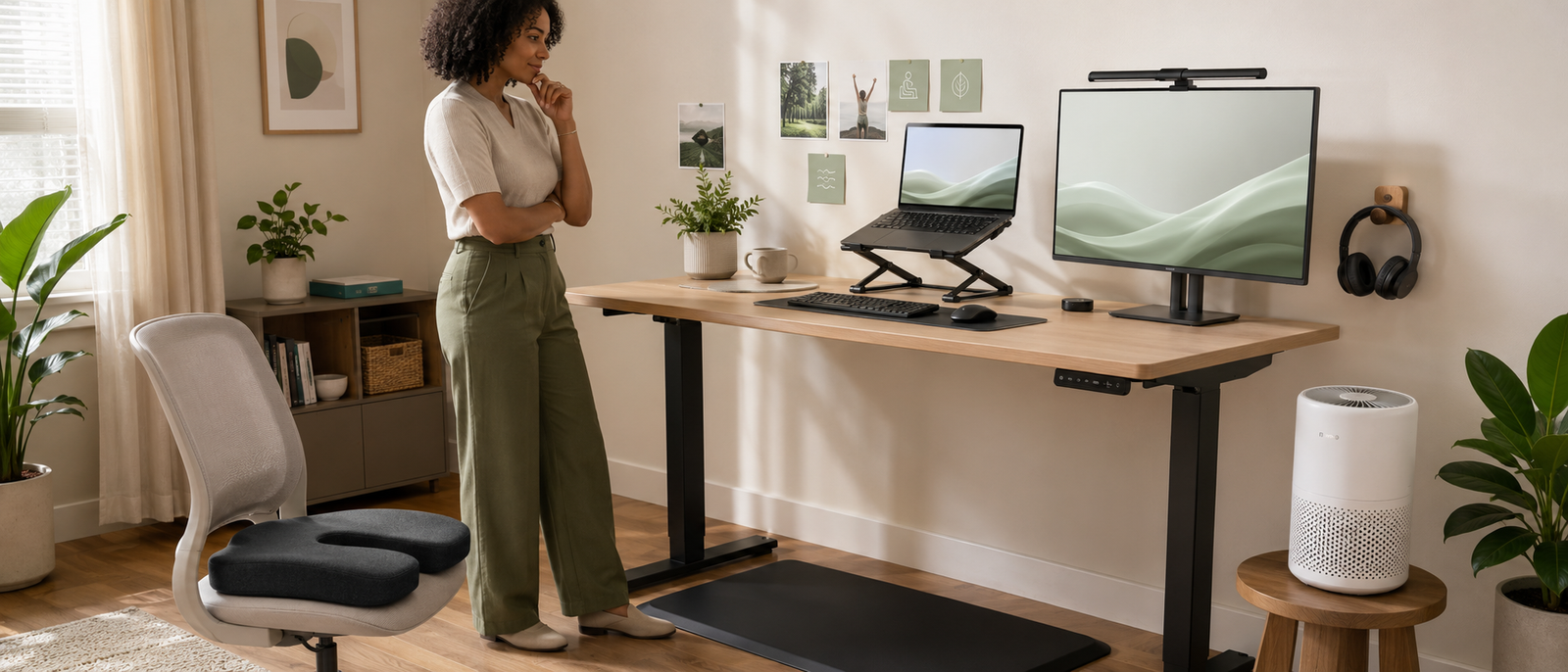
Work from home wellness upgrades under £100 should feel like proper setup improvements, not budget desk décor with a higher price ceiling. This guide is not about buying nicer clutter. It is about choosing one upgrade that improves the part of home working that keeps bothering you most: seat comfort, standing fatigue, laptop posture, air quality, lighting, focus or noise control.
Choose one real upgrade.
Comfort beats desk clutter.
Posture needs a full setup.
Air quality helps small rooms.
Lighting should reduce strain.
Focus tools need daily use.
Under £100 should feel substantial.
Most Relevant Audience
This article is for remote workers, home workers, desk workers, freelancers, bloggers, creators, side hustlers, parents, carers and small business owners who want meaningful setup upgrades without drifting into expensive office-makeover territory.
It is especially useful if your current setup is almost workable but still leaves you stiff, distracted, uncomfortable, screen-tired, boxed in or drained by noise. You do not need a full home office rebuild. You need one under-£100 upgrade that fixes the part of the day you keep tolerating.
What Makes An Under-£100 Upgrade Worth It?
It changes how the workspace functions
A good under-£100 upgrade should do more than make the desk look nicer. It should change how your workday feels or functions. A seat cushion can improve an ordinary chair. A standing mat can make standing breaks more comfortable. A laptop stand, keyboard and mouse setup can stop your posture depending on one low laptop screen.
This is the key difference from the under-£50 guide. Smaller upgrades can help with simple friction, but under £100 should buy something more substantial. The product should support comfort, movement, air, lighting or focus across a normal workday.
It solves a repeated problem
The best work from home wellness upgrades under £100 are linked to a problem that keeps coming back. If your chair feels uncomfortable every afternoon, seat support matters. If standing at your desk makes your feet ache, a proper mat helps. If your laptop keeps folding your neck into question-mark mode, a posture setup is more useful than another decorative lamp.
This is not about spending the full budget because the headline says £100. It is about matching the money to the repeated workday strain. The more often the problem appears, the more sense it makes to fix it properly.
It fits your real room
A useful upgrade should fit your actual workspace, not the imaginary home office you keep saving on Pinterest. Many people work from a spare room, bedroom corner, kitchen table, shared living space or small desk against a wall.
Before buying anything, think about where it will live, how often you will use it and whether it creates a new habit you can actually keep. A good upgrade should make the workday easier, not become another object you have to move, charge, clean, store or justify.
It works with the rest of the setup
No product works alone. A seat cushion helps more when screen height and desk position make sense. A laptop stand needs a separate keyboard and mouse to be genuinely useful. A monitor light bar works best when screen brightness and room lighting are sensible.
Under £100 is enough to improve one part of the setup properly, but not enough to ignore everything around it. Noise-cancelling headphones can help focus, but boundaries and breaks still matter. Buy the upgrade, then make the surrounding habits support it.
This guide is about work from home wellness upgrades under £100 that feel like a real step up from cheap desk accessories. The under-£50 guide is for smaller fixes like lighting cues, screen comfort, compact air support and simple routines. Here, the focus is on more substantial upgrades that improve comfort, movement, air, lighting or focus across a normal workday.
That difference matters. Under £100 should not mean a more expensive candle, a heavier notebook or a desk object with calmer packaging. It should mean better support, better positioning, cleaner air, better lighting or less noise. Prices change often, so confirm the current UK price, delivery cost and retailer offer before buying, especially when a product sits close to the £100 line.
The Best Work From Home Wellness Upgrades Under £100
ComfiLife Gel-Enhanced Seat Cushion Review
ComfiLife Gel-Enhanced Seat Cushion is the best seat support upgrade here for people using ordinary chairs that are not quite comfortable enough for long workdays. It is designed to add cushioning and support to an existing chair, which can make sense if you cannot replace the whole chair or do not want to spend hundreds on a premium ergonomic model.
This kind of upgrade is useful when the chair is close to workable but still leaves you uncomfortable after long sitting blocks. It will not fix every cause of back, hip or posture discomfort, and it should not replace medical advice for persistent or serious pain. Best for: basic office chairs, dining chairs or older desk chairs. Skip if: your chair is unstable, badly shaped or fundamentally the wrong height.
FlexiSpot MT1B Anti-Fatigue Mat Review
FlexiSpot MT1B Anti-Fatigue Mat is the best standing-desk mat upgrade if you already stand during the day or want to make standing breaks more comfortable. Standing can help add variety, but standing on a hard floor for long periods can create foot, leg or lower-back fatigue of its own.
A proper mat gives your feet a more forgiving surface and makes standing feel less harsh. The point is not to stand all day. The point is to make movement and position changes easier to repeat. Best for: standing desk users and sit-stand desk owners. Skip if: you do not plan to stand regularly or need a full movement routine more than a mat.
Nexstand K2 Remote Work Kit Review
Nexstand K2 Remote Work Kit is the best laptop posture setup because it tackles the real laptop problem: a low screen usually drags the neck, shoulders and upper back into awkward positions. A stand alone is useful, but a proper remote work kit with a keyboard and mouse makes the posture change much more practical.
This is one of the strongest under-£100 upgrade paths because it changes the working position rather than just adding comfort around a poor setup. Raising the laptop screen while continuing to type on the built-in keyboard can create a new problem. Best for: laptop workers whose neck or shoulders suffer from low-screen posture. Skip if: you already have a good stand, keyboard and mouse.
Levoit Core 200S Smart Air Purifier Review
Levoit Core 200S Smart Air Purifier is the best air-quality step-up under £100 for a small home office, bedroom workspace or spare room that feels stale, dusty, pet-heavy or hard to ventilate. This is a price-sensitive pick because it can sit right on the under-£100 line, so check delivery, filter cost and availability before treating it as a guaranteed under-£100 upgrade.
An air purifier will not solve every air-quality issue. It should not replace cleaning, ventilation or dealing properly with damp, mould or building problems. But if your workspace feels heavy during long sessions, a larger smart purifier can make the room feel fresher and easier to stay in. Best for: small rooms, pet households and dusty spaces. Skip if: your main issue is heat or a room much larger than the purifier is designed for.
Xiaomi Mi Computer Monitor Light Bar Review
Xiaomi Mi Computer Monitor Light Bar is the best monitor light bar upgrade for people who want better desk lighting without filling the room with lamps. A monitor light bar can brighten the desk surface, reduce the harsh contrast between screen and room, and make evening work feel less visually uncomfortable.
This is different from a small video light. A monitor light bar is about work surface lighting and screen-area comfort, especially if you work at a monitor in a dim room, write at night or dislike overhead lighting while working. Best for: monitor users, writers, editors, spreadsheet workers and designers. Skip if: you work only from a laptop or cannot mount it properly on your monitor.
Sony WH-CH720N Review
Sony WH-CH720N is the best focus and noise-control upgrade under £100 when the current UK price keeps it inside budget. It gives home workers a more serious way to manage background noise, calls, focus blocks and shared-home distractions. Noise is not just annoying. It can fragment attention, make deep work harder and leave you more tired by the end of the day.
This pick should stay in the main list only when it is genuinely under £100 at the time of publishing. If it only qualifies during short deals or jumps above the budget, treat it as deal-dependent or replace it with a more reliable under-£100 noise-control option. Best for: noisy households, shared spaces, flats, busy streets or call-heavy roles. Skip if: you dislike over-ear headphones or need a microphone-first headset.
Kensington SoleMate Plus Footrest
Kensington SoleMate Plus Footrest is worth considering if your real problem is desk height, dangling feet or poor chair fit. A footrest can help when your feet do not rest comfortably on the floor, especially if you need your chair higher to match the desk and keyboard.
This should remain a secondary option rather than a main pick because it solves a narrower fit problem. If your feet already rest comfortably and your chair height works, a footrest may not change much. But for shorter users, awkward desk heights or dining-chair setups, it can be a small but meaningful ergonomic support.
Which Upgrade Should You Buy First?
If your chair is the problem
Start with seat support if your current chair is close to usable but uncomfortable during longer blocks. ComfiLife Gel-Enhanced Seat Cushion is the most relevant pick when you need extra comfort without replacing the whole chair. If the chair is broken, unstable or the wrong height, a cushion may not be enough.
If standing makes you tired
Start with the standing surface if you already use a standing desk but avoid standing because the floor feels hard or tiring. FlexiSpot MT1B Anti-Fatigue Mat is the sensible first upgrade for making standing breaks more comfortable. Pair it with regular position changes rather than treating standing as a full-day posture.
If your laptop posture is poor
Start with the full laptop setup if your screen sits too low and your neck keeps paying the bill. Nexstand K2 Remote Work Kit is the strongest option because the stand, keyboard and mouse work together. Raising the screen matters, but so does keeping your hands, shoulders and wrists comfortable.
If the room feels stale
Start with air quality if your small workspace feels dusty, pet-heavy, closed in or difficult to ventilate. Levoit Core 200S Smart Air Purifier is the best step-up from compact air support, but filter costs and current pricing matter. It works best as part of a cleaner, better-ventilated room rather than a magic fix.
If your desk lighting feels harsh
Start with task lighting if your screen area feels visually tiring, especially in low light. Xiaomi Mi Computer Monitor Light Bar is useful for monitor-based work because it improves the desk surface without relying on overhead light. It is less relevant if you work only from a laptop or already have strong task lighting.
If noise keeps breaking focus
Start with focus and privacy if household noise, calls, traffic or shared spaces keep pulling you out of work. Sony WH-CH720N is the best pick when it is genuinely under £100. Noise control can be a major upgrade if your attention is being drained by sounds you cannot fully control.
What Not To Buy Under £100
Nicer clutter
The under-£100 budget can tempt you into buying more polished versions of things you do not need. A nicer tray, heavier notebook or premium-looking desk ornament may feel satisfying, but it does not automatically make the workday healthier.
If it does not improve comfort, movement, air, lighting, focus or recovery, be honest about what it is. It may be décor. It may be pleasant. It may not be a wellness upgrade.
Recycled under-£50 fixes
This article should not feel like the under-£50 guide with pricier versions. Do not lead with small lighting cues, compact air support, basic smart routines, simple screen accessories or ambient desk touches here. Those products have their place, but this guide is about more substantial setup improvements.
The best under-£100 upgrades should change the way the workspace functions. That means better seating support, standing comfort, laptop posture, air quality, task lighting or focus control.
Products that create more friction
A product is not a good wellness upgrade if it adds more work than it removes. If you have to move it constantly, charge it daily, clean it too often, rearrange your desk around it or troubleshoot it every week, the benefit may disappear quickly.
The best upgrades fit into the day quietly. They support the routine without becoming the main character.
Vague wellness objects
Be careful with products that promise calm, productivity, balance or wellbeing without a clear mechanism. A real under-£100 upgrade should have a job: support your seat, reduce standing discomfort, raise your screen, improve air, improve lighting or reduce noise.
If the product mostly sells a mood, slow down before buying it.
Common Under-£100 Wellness Upgrade Mistakes
Spending more without solving more
A higher budget does not automatically mean a better choice. Spending £90 on the wrong product is worse than spending £40 on the right one. Start with the friction, then choose the upgrade. Do not start with the price ceiling.
Buying around the real problem
Many people buy the pleasant thing instead of the useful thing. If your back is uncomfortable, a light will not fix that. If your laptop is too low, headphones will not fix your posture. If the room is stale, a monitor light bar will not clean the air. Match the product to the problem.
Forgetting compatibility
Under-£100 products often need to fit something else. A laptop stand needs the right laptop size and desk depth. A monitor light bar needs the right monitor shape. A seat cushion needs to fit the chair. An air purifier needs the right room size. A standing mat needs floor space.
Compatibility is not boring. It is the difference between a useful upgrade and a return label.
Ignoring running costs
Some upgrades cost more over time. Air purifiers need filters. Headphones may need replacement ear pads eventually. Smart devices and lighting may need app setup or power access. The upfront price matters, but so does the maintenance.
Expecting the product to replace habits
No under-£100 product can remove the need for breaks, movement, screen care, boundaries or recovery. A better setup makes good habits easier, but it does not do them for you. A mat helps standing feel better. You still need to change position. Headphones reduce noise. You still need breaks from input.
Buying before checking the current price
The under-£100 line is price-sensitive. Some products move above and below the limit depending on retailer, colour, bundle, discount or delivery cost. Check the current UK price before buying, and do not count a product as under £100 if delivery pushes it over budget.
FAQ
What are the best work from home wellness upgrades under £100?
The best work from home wellness upgrades under £100 are products that meaningfully improve comfort, movement, air, lighting, posture or focus. Strong options include seat cushions, anti-fatigue mats, laptop stand kits, smart air purifiers, monitor light bars and noise-cancelling headphones.
What home office upgrades are actually worth buying?
Home office upgrades are worth buying when they solve a repeated workday problem. If your chair hurts, improve seating support. If your laptop posture is poor, raise the screen and add a keyboard and mouse. If noise drains focus, consider headphones. The best upgrade is tied to real friction.
What should I upgrade first in my work from home setup?
Upgrade the part of your setup that bothers you most often. Start with seating if you feel uncomfortable, laptop posture if your neck and shoulders ache, air quality if the room feels stale, lighting if your desk feels harsh or gloomy, and headphones if noise keeps breaking focus.
Are under-£100 wellness products worth it?
Under-£100 wellness products can be worth it when they improve the workday in a practical way. They are not worth it if they are vague, decorative or only make the desk look nicer. A good under-£100 upgrade should make the setup more comfortable, usable or sustainable.
What helps make working from home more comfortable?
Working from home feels more comfortable when your chair supports you, your screen is at a sensible height, your feet and arms are relaxed, the room feels fresh, lighting is comfortable and noise is under control. Movement breaks and clear shutdown habits still matter too.
Should I buy ergonomic, air quality, lighting or focus upgrades first?
Choose based on the problem. Buy ergonomic support first if your body feels uncomfortable. Choose air quality if the room feels stale. Choose lighting if the desk feels visually tiring. Choose focus tools if noise or interruptions drain attention. Do not buy by category. Buy by friction.
Final Verdict
The best work from home wellness upgrades under £100 should feel like proper setup improvements, not budget desk décor with a higher price ceiling. ComfiLife Gel-Enhanced Seat Cushion is the best first upgrade if your ordinary chair needs better seat support. FlexiSpot MT1B Anti-Fatigue Mat is a smart pick if standing breaks feel uncomfortable. Nexstand K2 Remote Work Kit is the strongest posture upgrade for laptop workers.
Levoit Core 200S Smart Air Purifier is the best air-quality step-up for small rooms when the current price and delivery keep it under £100. Xiaomi Mi Computer Monitor Light Bar is a useful lighting upgrade for monitor-based work. Sony WH-CH720N is the best focus and noise-control pick when it is genuinely under £100 at the time of publishing. Spend carefully on the part of the day that keeps bothering you, because one thoughtful upgrade can do more than five nice-looking objects that never solve the actual problem.