Eden Creator Store Explained: Can One…

Redbubble vs Printify: Which Print-on-Demand Platform…

Can Free Affinity Help You Build…

Can Hostinger AI Builder Launch a…

Plug-In Solar Panels UK: Are They…

Meta One Explained: Is the Subscription…

Plaud One Explained: UK Price, Plans…

Namecheap vs Dynadot

Kit (ConvertKit) vs beehiiv: Which Should…

Bluehost vs Siteground

Namecheap review

Cloudways Vs WP Engine
Most businesses do not begin with a messy software stack. It grows quietly. Email marketing sits in one tool, customer notes live elsewhere, sales pipelines hide in spreadsheets, and reporting becomes a scavenger hunt with better branding. HubSpot became popular because it brings CRM, marketing, sales, automation, customer management, and reporting into one connected platform instead of forcing teams to juggle disconnected tools every day.
Quick Overview
In this review you will learn:

CRM and marketing platform supporting business growth and customer management.
Helpful next reads: GetResponse review
What Is HubSpot?
HubSpot Is A Customer Platform
HubSpot combines CRM, email marketing, sales tools, lead capture, forms, landing pages, automation, reporting, customer service, and content management features. The main idea is simple: keep customer activity and business communication in one place rather than scattered across separate tools.
It Reduces Tool Switching
Many growing businesses lose time moving between email platforms, spreadsheets, calendars, form builders, sales tools, and reporting dashboards. HubSpot reduces that friction by connecting marketing, sales, and customer data inside one shared environment.
Customer Data Sits At The Centre
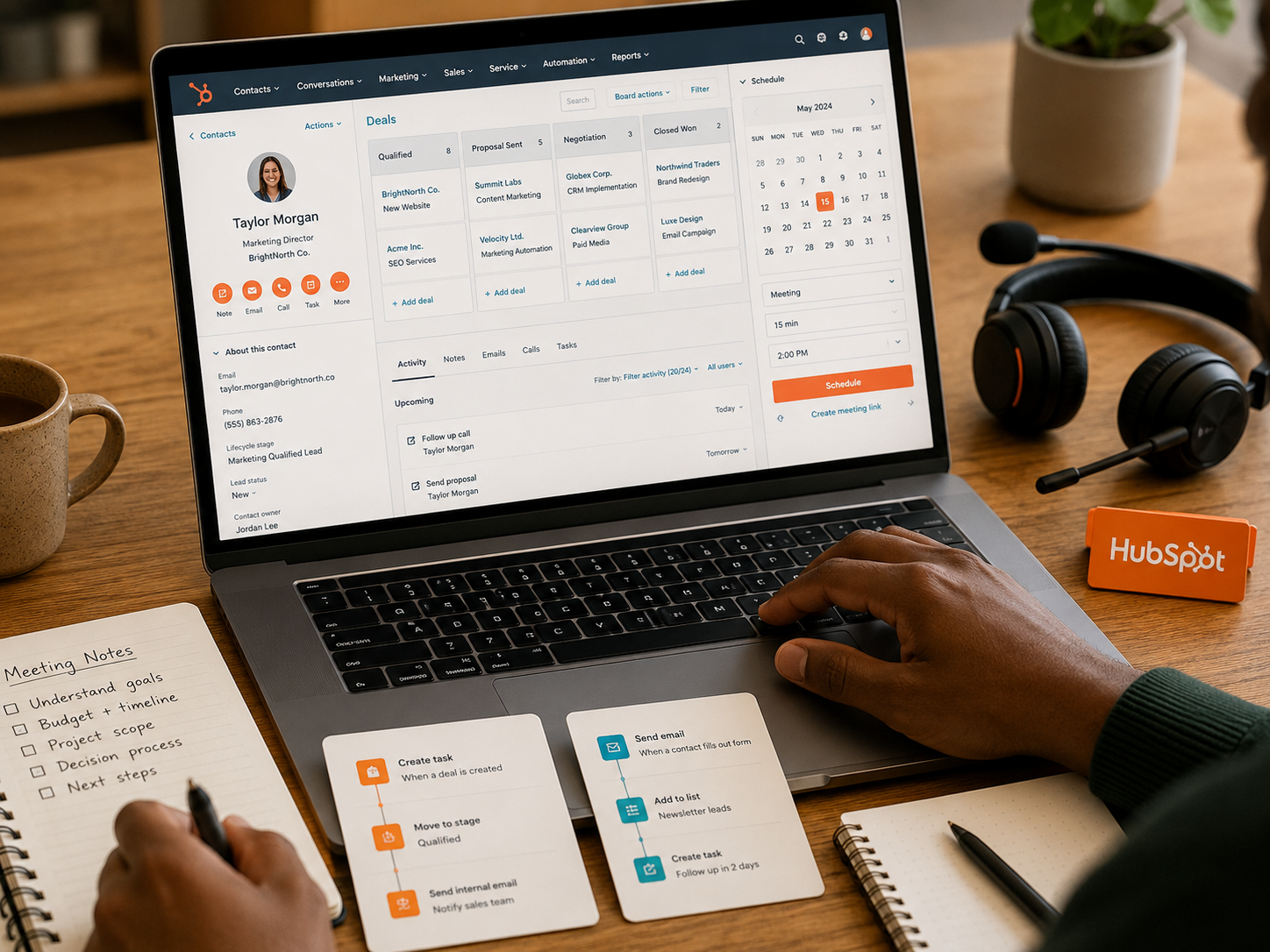
Every form submission, email, call, meeting, deal, support conversation, and website interaction can connect back to a customer record. This gives teams a clearer view of what has happened without digging through inboxes like digital archaeologists.

Customer management system supporting marketing, sales, and automation.
It Helps Teams See The Same Picture
HubSpot works best when several people need visibility across the customer journey. Sales can see marketing activity, marketing can see lead quality, and business owners can understand where opportunities are getting stuck.

HubSpot CRM Explained
HubSpot CRM is the foundation of the platform and often the first reason businesses start using it. Customer details, notes, emails, meetings, website activity, tasks, deals, and communication history can all sit in one record. For small teams, this removes the familiar problem of wondering who last contacted a lead, where a deal stands, or which spreadsheet contains the latest information. It is not glamorous, but neither is losing a warm lead because someone forgot to update column G.
Explore more insights: Email marketing automation explained
Is HubSpot Free?
The Free CRM Is Useful
HubSpot's free CRM is more than a decorative trial. It gives smaller businesses contact management, company records, deal tracking, tasks, forms, basic reporting, and enough structure to organise customer relationships before paying for a larger software setup.
Small Teams Can Start Without Paying
A freelancer, consultant, small agency, or early-stage business can use the free tools to replace messy spreadsheets and scattered notes. This makes HubSpot appealing before a company has the budget for full marketing automation.
The Free Plan Has Limits
The free version becomes restrictive when a business needs deeper automation, more advanced reporting, larger marketing campaigns, stronger team controls, custom objects, or more sophisticated customer journeys. That is where paid plans enter the conversation.

Customer relationship management system supporting business organisation.
It Works Best As A Starting Point
The free CRM is excellent for organising early customer activity, but many businesses eventually upgrade once marketing, sales, and service processes become more complicated. That upgrade path is part of HubSpot's appeal and part of its cost risk.

HubSpot Pricing Explained
Pricing Depends On The Hubs
HubSpot is split into different hubs, including Marketing Hub, Sales Hub, Service Hub, Content Hub, Operations Hub, and Commerce Hub. Businesses can start with one area and expand later as their needs become more complex.
Costs Can Rise Quickly
The biggest pricing frustration appears when businesses add contacts, seats, automation, reporting, and advanced features. HubSpot can move from affordable to serious monthly expense faster than expected if a team does not plan carefully.
Small Businesses Should Budget Ahead
The free tools are attractive, but businesses should think about the features they may need six or twelve months later. Nobody enjoys rebuilding their customer system because the upgrade path suddenly feels too expensive.

Business software platform supporting scalable growth systems.
Value Depends On Consolidation
HubSpot becomes easier to justify when it replaces several separate subscriptions. If it removes a CRM, email tool, forms platform, landing page builder, automation software, and reporting dashboard, the cost can make more sense.

HubSpot Marketing Hub
Marketing Hub Is A Major Attraction
Marketing Hub includes email campaigns, landing pages, forms, segmentation, lead nurturing, automation workflows, campaign tracking, and reporting. It is designed for businesses that want marketing activity connected directly to customer records.
Customer Journeys Become Clearer
Because marketing activity connects to the CRM, teams can see which forms, emails, pages, and campaigns influenced leads. This helps avoid the classic business meeting where everyone has opinions and nobody has the numbers.
Automation Reduces Manual Follow-Up
HubSpot workflows can respond automatically when leads complete forms, open emails, book meetings, request information, or move through sales stages. This helps teams follow up more consistently without manually chasing every small action.
Reporting Feels More Connected
Marketing reports become more useful when they connect to sales and customer data. Instead of only seeing clicks or opens, businesses can understand whether campaigns are generating useful leads and actual revenue opportunities.
HubSpot Breeze AI
HubSpot Breeze AI is designed to help users create content, analyse customer information, automate repetitive tasks, and work faster inside the platform. The useful part is not simply that HubSpot has AI, because almost every software company now acts like adding AI is a personality trait. The practical benefit is having AI support close to customer records, campaigns, sales activity, and reports, which can reduce switching between separate tools.
Frequently read together: ConvertKit review
HubSpot Vs Salesforce
HubSpot Usually Feels Easier
HubSpot generally suits businesses that want a strong CRM and marketing platform without immediately needing enterprise-level complexity. Navigation, onboarding, and daily use tend to feel more approachable for small and medium-sized teams.

Salesforce Offers Greater Depth
Salesforce is often better suited to larger organisations needing deep customisation, complex sales processes, advanced permissions, and enterprise-scale flexibility. The trade-off is a steeper learning curve and often more setup support.

CRM comparison supporting business software decisions.
Smaller Teams Often Prefer HubSpot
For small businesses, agencies, consultants, and growing teams, HubSpot can provide enough power without requiring a dedicated technical administrator. That makes it easier to adopt and less intimidating day to day.
Enterprise Teams May Prefer Salesforce
Large companies with complex structures may prefer Salesforce because it can be shaped around detailed internal processes. HubSpot can scale well, but Salesforce remains stronger for highly customised enterprise environments.
HubSpot Alternatives
HubSpot alternatives include Salesforce, ActiveCampaign, Zoho CRM, Pipedrive, Mailchimp, Keap, and GetResponse. Salesforce suits complex enterprise sales operations, ActiveCampaign is strong for email automation, Pipedrive is popular for sales pipelines, and Mailchimp remains familiar for simpler email marketing. HubSpot is strongest when a business wants CRM, marketing, sales, service, automation, and reporting to work together rather than building a stack from separate tools.
Readers also enjoyed: Mailchimp review
Is HubSpot Worth It?
It Depends On Complexity
A solo freelancer managing five clients may not need the full HubSpot ecosystem. A growing team handling leads, campaigns, sales conversations, customer records, and reporting across several people will usually see more value.
Growing Businesses Benefit Most
HubSpot becomes more useful once customer activity starts spreading across inboxes, spreadsheets, forms, calendars, and different marketing tools. At that point, the platform helps bring order before everything turns into admin soup.
Consolidation Is The Main Benefit
HubSpot's biggest value is not one single feature. It is the way the CRM, email, automation, sales tools, service tools, and reports connect. That connected view can save time and improve decision-making.
Unified software platform supporting sales, marketing, and customer management.
Cost Must Be Watched
HubSpot is worth it when the platform replaces confusion, improves follow-up, and supports revenue growth. It is less convincing when a small business pays for features it barely uses.
Pros And Cons Of HubSpot
Pros
Cons
FAQs
What is HubSpot and how does it work?
HubSpot is a customer platform that combines CRM, marketing, sales, service, automation, reporting, and customer management tools in one ecosystem.
Is HubSpot really free?
Yes. HubSpot offers a useful free CRM with contact management, deal tracking, forms, tasks, and basic reporting. More advanced features require paid plans.
How much does HubSpot cost?
HubSpot can range from free to much higher monthly costs depending on the hubs, seats, contacts, automation features, and subscription level a business chooses.
Is HubSpot worth it for small businesses?
HubSpot can be worth it for small businesses that need better customer organisation, lead tracking, email marketing, and reporting. Very small teams may not need the full paid ecosystem.
What are the best HubSpot alternatives?
Popular HubSpot alternatives include Salesforce, ActiveCampaign, Zoho CRM, Pipedrive, Mailchimp, Keap, and GetResponse depending on business needs.
Final Verdict
HubSpot works because it solves a real growing-business problem: too many tools, too many spreadsheets, and too much customer information living in places nobody checks until something goes wrong. The CRM is genuinely useful, the free plan is strong, Marketing Hub is powerful, and the connected ecosystem can reduce daily admin. Pricing is the main concern, especially as businesses add features and contacts. For teams tired of juggling marketing tools separately, HubSpot remains one of the strongest all-in-one platforms available.